Search for and click the location of an image on screen, with an offset.
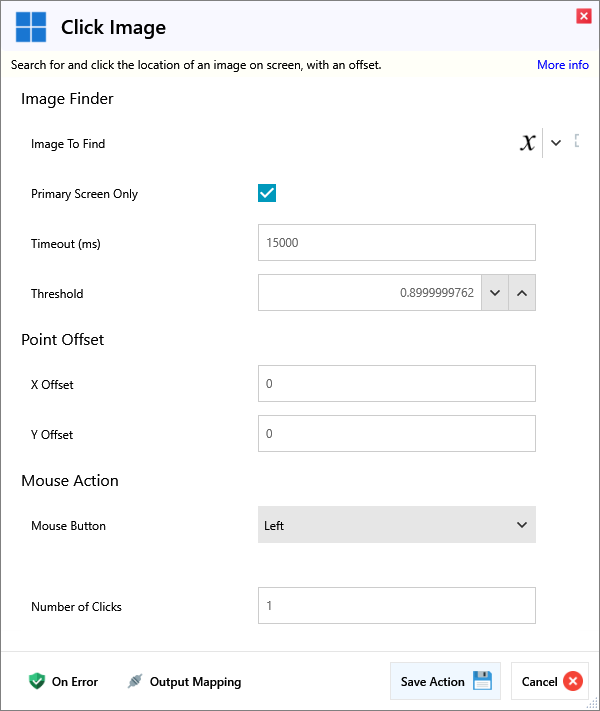
Input
Image Finder
| Name | Required | Description |
|---|
| Image To Find | | The image to search for on the primary screen. |
| Primary Screen Only | | Only search the primary screen for the image. |
| Timeout (ms) | | How long to keep looking for the image on screen before giving up. |
| Threshold | | Threshold value for image match confidence, between 0 and 1. |
Point Offset
| Name | Required | Description |
|---|
| X Offset | | X Offset to apply from the centre of the found location. |
| Y Offset | | Y Offset to apply from the centre of the found location. |
Mouse Action
| Name | Required | Description |
|---|
| Mouse Button | | Which button should be clicked |
| Name | Required | Description |
|---|
| Number of Clicks | | How many times you want to click. Default is 1. |
Output
| Name | Required | Description |
|---|
| Action Success | | True if the action passed, false if it failed. |
